
You are not logged in.
- Topics: Active | Unanswered
- Index
- » Search
- » Posts by rcla
Pages: 1
#1 Re: mORMot 2 » THttpWebsocketAsyncServer and ProcessIdleTix catched » 2026-08-03 18:28:33
Sorry for the inconvenience. It was my mistake, as I had mixed up several test versions.
I have corrected my code and updated it to the latest version of mORMot2 '2.4.16181'.
It works like a charm.
Many thanks for developing mORMot2.
#2 mORMot 2 » THttpWebsocketAsyncServer and ProcessIdleTix catched » 2026-08-02 02:52:57
- rcla
- Replies: 1
I have a THttpWebsocketAsyncServer running on Windows 11 with PostgreSQL 18.0 and HTML/JavaScript clients.
WebSocket communication and queries are working correctly.
However, once there are no remaining connected clients (WebSocket connections), an "Access violation" error begins to appear every second after a few hours.
I enabled LOG_VERBOSE to see what was happening, and I found that when the last active client disconnects, the following appears:
20260801 08303936  1  +    mormot.rest.sqlite3.TRestServerDB(076a9b50) Shutdown() root CurrentRequestCount=0
20260801 08303936  1  -    00.002.402
20260801 08303937  1 info  mormot.rest.sqlite3.TRestServerDB(076a9b50) TRest.Destroy root
20260801 08303937  1  +    mormot.orm.sqlite3.TRestOrmServerDB(076ad370) Destroy root
20260801 08303937  1  +    	mormot.db.raw.sqlite3.TSqlDatabase(06fac2e0) Destroy
20260801 08303937  1  +    		mormot.db.raw.sqlite3.TSqlDatabase(06fac2e0) DBClose
20260801 08303937  1 DB    			mormot.db.raw.sqlite3.TSqlDatabase(06fac2e0) closing [:memory:] 4 KB
20260801 08303937  1  -    		00.005.076
20260801 08303937  1  -    	00.010.371
20260801 08303937  1  -    00.015.342
Subsequently, it begins to show:
20260801 09390208  4 trace mormot.net.ws.async.TWebSocketAsyncConnections(060686f0) DoGC #1=0 #2=1 free=0 client=0
20260801 09391142  4 trace mormot.net.ws.async.TWebSocketAsyncConnections(060686f0) DoGC #1=0 #2=0 free=1 client=0
20260801 09405120  0 warn  mormot.net.ws.async.TWebSocketAsyncConnection(06e62f80) OnRead: close connection after ErrorRejected (before=GetCommand)
20260801 09405146  4 trace mormot.net.ws.async.TWebSocketAsyncConnections(060686f0) DoGC #1=0 #2=2 free=0 client=0
20260801 09410117  4 trace mormot.net.ws.async.TWebSocketAsyncConnections(060686f0) DoGC #1=0 #2=0 free=2 client=0
20260801 09463020  4 trace mormot.net.ws.async.TWebSocketAsyncConnections(060686f0) DoGC #1=0 #2=1 free=0 client=0
20260801 09464024  4 trace mormot.net.ws.async.TWebSocketAsyncConnections(060686f0) DoGC #1=0 #2=0 free=1 client=0
20260801 10100040  1 warn  mormot.net.ws.async.TWebSocketAsyncConnection(06e63b80) OnRead: close connection after ErrorRejected (before=GetCommand)
And finally:
20260801 19392240  4 EXCOS EExternalException (c0000005 EXCEPTION_ACCESS_VIOLATION) [8080] at 01001d1b5b  {16 0.11 0.17 2 4.6GB/15.4GB 66581b01}
20260801 19392243  4 warn  mormot.net.ws.async.TWebSocketAsyncConnections(060686f0) ProcessIdleTix catched {EAccessViolation(073a9b70):{Message:"Access violation"}}
20260801 19392340  4 EXCOS EExternalException (c0000005 EXCEPTION_ACCESS_VIOLATION) [8080] at 01001d1b5b  {16 0.11 0.17 2 4.6GB/15.4GB 66581b01}
20260801 19392340  4 warn  mormot.net.ws.async.TWebSocketAsyncConnections(060686f0) ProcessIdleTix catched {EAccessViolation(073a9ab0):{Message:"Access violation"}}
20260801 19392439  4 EXCOS EExternalException (c0000005 EXCEPTION_ACCESS_VIOLATION) [8080] at 01001d1b5b  {16 0.11 0.17 2 4.6GB/15.4GB 66581b01}
20260801 19392439  4 warn  mormot.net.ws.async.TWebSocketAsyncConnections(060686f0) ProcessIdleTix catched {EAccessViolation(073a9b70):{Message:"Access violation"}}
20260801 19392460  4 trace mormot.net.ws.async.TWebSocketAsyncConnections(060686f0) DoGC #1=1 #2=1 free=0 client=1
20260801 19392540  4 EXCOS EExternalException (c0000005 EXCEPTION_ACCESS_VIOLATION) [8080] at 01001d1b5b  {16 0.11 0.17 2 4.6GB/15.4GB 66581b01}
20260801 19392540  4 warn  mormot.net.ws.async.TWebSocketAsyncConnections(060686f0) ProcessIdleTix catched {EAccessViolation(073a9ab0):{Message:"Access violation"}}
20260801 19392545  4 trace mormot.net.ws.async.TWebSocketAsyncConnections(060686f0) DoGC #1=0 #2=2 free=0 client=1
Thank you for any help you can provide.
#3 Re: mORMot 2 » TWebSocketAsyncServer and MacOS » 2026-07-20 15:25:37
I updated to version '2.4.15874'.
It works like a charm.
It has been running for two hours with the Safari browser, and the WebSocket connection hasn't interrupted.
Thank you so much for your help.
#4 Re: mORMot 2 » TWebSocketAsyncServer and MacOS » 2026-07-18 18:35:20
I initially made that change, but the WebSocket connection kept closing, and I encountered other types of opcodes...
So, I reverted to the original code, recompiled, and switched to the Microsoft Edge browser (the same one that was working on Windows).
Now it works without issues. It has been running for two hours and hasn't closed.
You were absolutely right; the problem was on the JavaScript client side.
Thank you very much for all your help.
#5 Re: mORMot 2 » TWebSocketAsyncServer and MacOS » 2026-07-18 16:04:27
I am using the Safari browser.
Thank you for your help and detailed explanation. (ws analysys.md)
Inside Quick Fix/Workaround:
  if not GetBytes(@hdr.mask, 4) then
  begin
     ...
shows Error: Identifier not found "GetBytes"
Maybe it should be "HasBytes"?
I am going to make this change and run more tests.
#6 Re: mORMot 2 » TWebSocketAsyncServer and MacOS » 2026-07-18 14:21:00
Regarding "mORMot2 regression tests" on my M4 MacBook Air:
With the "OpenSSLMacA64.tgz" libraries you provided, everything now shows as OK. Thanks.
Total failed assertions across all test suites: 0/197,972,570
For the "echo" test program, I added the following "writeln()" statements:
function TWebProcessInFrame.GetHeader: boolean;
begin
  result := false;

  WriteLn('');
  WriteLn('Start GetHeader');

  if len = 0 then
  begin
    data := '';
    FillCharFast(hdr, SizeOf(hdr), 0);
  end;
  if not HasBytes(@hdr, 2) then // first+len8
    exit;
  opcode := TWebSocketFrameOpCode(hdr.first and 15);
  masked := hdr.len8 and FRAME_LEN_MASK <> 0;

  WriteLn('opcode: ', opcode);
  WriteLn('masked: ', masked);

  if masked then
    hdr.len8 := hdr.len8 and (FRAME_LEN_MASK - 1);
  if hdr.len8 < FRAME_LEN_2BYTES then
    hdr.len32 := hdr.len8
  else if hdr.len8 = FRAME_LEN_2BYTES then
  begin
    if not HasBytes(@hdr, 4) then // first+len8+len32.low
      exit;
    hdr.len32 := bswap16(hdr.len32);
  end
  else if hdr.len8 = FRAME_LEN_8BYTES then
  begin
    if not HasBytes(@hdr, 10) then // first+len8+len32+len64.low
      exit;
    if hdr.len32 <> 0 then // size is more than 32 bits (4GB) -> reject
      hdr.len32 := maxInt
    else
      hdr.len32 := bswap32(hdr.len64);
    if hdr.len32 > WebSocketsMaxFrameMB shl 20 then
      EWebSockets.RaiseUtf8('%.GetFrame: length = % should be < % MB',
        [process, KB(hdr.len32), WebSocketsMaxFrameMB]);
  end;

  WriteLn('hdr_mask: ', hdr.mask);
  WriteLn('hdr_first: ', hdr.first);
  WriteLn('hdr_len8: ', hdr.len8);
  WriteLn('hdr_len32: ', hdr.len32);
  WriteLn('hdr_len64: ', hdr.len64);

  if masked then
  begin
    len := 0; // not appended to hdr
    if not HasBytes(@hdr.mask, 4) then
      EWebSockets.RaiseUtf8('%.GetFrame: truncated mask', [process]);
  end;
  len := 0; // prepare upcoming GetData
  result := true;
end;
And it shows:
Start GetHeader
opcode: focPong
masked: TRUE
hdr_mask: 0
hdr_first: 138
hdr_len8: 0
hdr_len32: 0
hdr_len64: 0
Sometimes the error occurs and the WebSocket connection closes the second time "focPong" is executed; at other times, it happens the fourth time.
#7 Re: mORMot 2 » TWebSocketAsyncServer and MacOS » 2026-07-18 03:55:14
Using my MacBook Air with the M4 chip, I installed Rosetta and built an x64 version of Lazarus.
I compiled the "echo" example for x64 and ran it on the MacBook with the M4 chip, but the WebSocket connection closed after about two minutes.
I managed to borrow a 2019 MacBook Pro with an Intel Core i9 processor. I ran the same x64 "echo" example, and it took longer for the WebSocket connection to close around 13 minutes.
I ran the "mORMot2 Regression Tests" on both computers:
Test1: mORMot 2.4.15851 and Apple M4
macOS 26.5.2 Tahoe (Darwin 25.5.0) [utf8 16GB 19050003]
10 x Apple M4 [4MB] (aarchcpu64)
on Mac16,13
Using mORMot 2.4.15851 17 Jul 2026
TSqlite3LibraryStatic 3.51.2 with internal MM
Generated with: Free Pascal 3.2.3 64 bit OSX compiler
Total assertions failed for all test suits: 13 / 196,078,851
Test2: mORMot 2.4.15851 and MacBookPro Intel Core i9
macOS 26.3.1 Tahoe (Darwin 25.3.0) [utf8 32GB 19030003]
16 x Intel(R) Core(TM) i9-9980HK CPU @ 2.40GHz [16MB] (x64)
on MacBookPro16,1
Using mORMot 2.4.15851 17 Jul 2026
TSqlite3LibraryStatic 3.51.2 with internal MM
Generated with: Free Pascal 3.2.3 64 bit OSX compiler
Total assertions failed for all test suits: 13 / 195,368,976
#8 Re: mORMot 2 » TWebSocketAsyncServer and MacOS » 2026-07-17 16:32:57
For the moment, I don't have another Mac computer.
That’s how I adjusted the package: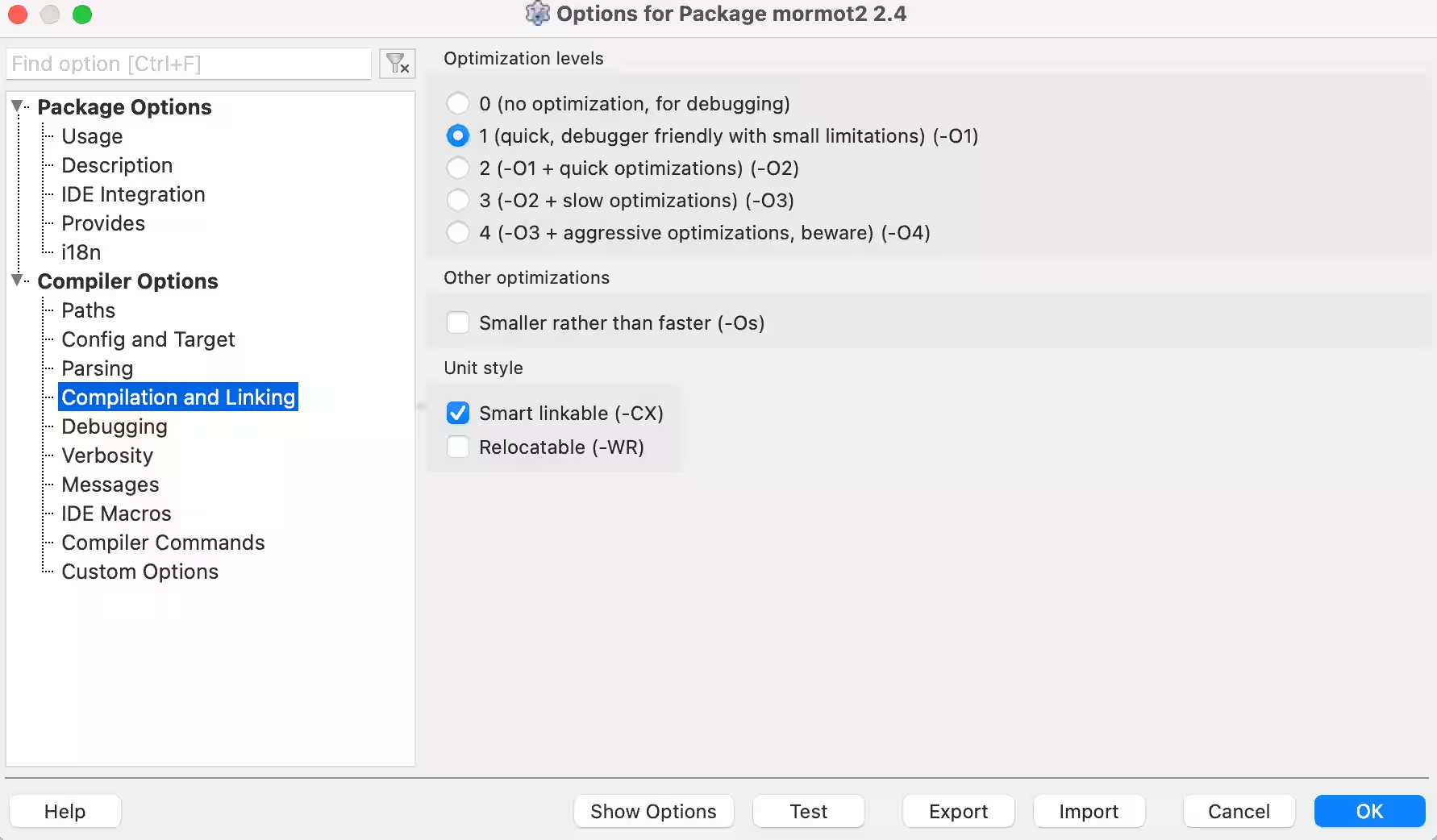
#9 Re: mORMot 2 » TWebSocketAsyncServer and MacOS » 2026-07-17 13:47:27
The compilation level used is -O1 with FPC 3.2.3 (fixes branch).
Right now, I only have another PC running Windows 11, and it works fine on that one.
An example to reproduce the issue in a Gist. It is the echo server program adapted to "WebSocketAsyncServer".
Point your browser to http://localhost:8888/ for initial page
Wait a few seconds, and the WebSocket connection closes.
#10 mORMot 2 » TWebSocketAsyncServer and MacOS » 2026-07-17 01:25:06
- rcla
- Replies: 14
I had built a "WebSocketAsyncServer" with several "HTML" clients using FPC 3.2.3 (fixes branch) on Windows 11; it had been running very well for several months.
mORMot2 is excellent and very robust. Many thanks for its development.
Recently, my development PC was replaced with a Mac featuring an M4 chip.
I can compile the same server program for macOS aarch64 without errors.
However, I am encountering some issues while running it.
I managed to run a very simple test where I merely establish a WebSocket connection without sending or receiving any data.
After a few seconds, the connection closes, and the server displays the following error:
EXC EWebSockets {Message:"TWebSocketAsyncProcess.GetFrame: truncated mask"}However, if I cross-compile it, run it on Windows, and perform the same test, the connection is established successfully and does not close.
I have already tried using FPC 3.3.1 (trunk branch), but the same thing happens.
I would appreciate any help you can provide.
#11 mORMot 2 » Orm with Boolean type and Batch » 2026-02-01 17:22:21
- rcla
- Replies: 0
Basically, I'm using ORM with an external PostgreSQL database.
  TOrmBuy = class(TOrm)
  private
    fcant: integer;
    fprice: integer;
    fdescrip: RawUtf8;
    factive: Boolean;
    fexpimp: Boolean;
  published
    property cant: integer read fcant write fcant;
    property price: integer read fprice write fprice;
    property descrip: RawUtf8 read fdescrip write fdescrip;
    property active: Boolean read factive write factive;
    property expimp: Boolean read fexpimp write fexpimp;
  end;

  myBuy := TOrmBuy.Create;

  //This is filled in with the respective data
  //Just to give one example (The values are actually filled in another function)
  for i := 0 to 300 do
  begin
    myBuy.cant := 3;
    myBuy.active := True;
    ServerDB.Add(myBuy, True);
  end;
It works perfectly well. But obviously it will take some time.
That's why I decided to use Batch.
  myBatch := TRestBatch.Create(ServerDB.Orm,nil);

  for i := 0 to 300 do
  begin
    myBuy.cant := 3;
    myBuy.active := True;
    myBatch.Add(myBuy,True);
  end;

  cresu := ServerDB.BatchSend(myBatch);
But there is an exception and it doesn't work:
TSqlDBPostgresLib Error "active" is type boolean but the expression is of type bigint
I understand that SQLite doesn't have a boolean type, but why does it work without Batch?
What do I need to do to make it work?
Thank you for any help you can provide.
#12 Re: mORMot 2 » More mORMot2 examples: adapted from DMVCframework » 2025-12-25 15:57:44
@Javierus , Thank you very much for all that number of examples, in addition to all the SAD documentation that you have provided.
I'm using FPC 3.2.3 (fixes) with Windows 11 and wanted to learn about HTTP Basic Authentication.
So I took the "08-basicauth" example, but I ran into the following issues:
It was showing a related error that "RegisterInterfaces" was missing...
I fixed it by adding the following code to the "api.interfaces.pas" file:initialization TInterfaceFactory.RegisterInterfaces([TypeInfo(IBasicAuthApi)]);Inside the Log file, an error related to "useHttpApiRegisteringURI" is displayed.
"TRestHttpServer(06222840) Create: HttpSetServiceConfiguration() failed: ERROR_ACCESS_DENIED (5) for root - useHttpApiRegisteringURI may need admin rights"
"EXC ERestHttpServer {Message:"TRestHttpServer: http.sys URI registration error ERROR_ACCESS_DENIED for http://+:8080/root (you need to register the URI - try to use useHttpApiRegisteringURI)"}"
I solved it by changing from "HTTP_DEFAULT_MODE" to "useHttpAsync"// Create HTTP server fHttpServer := TRestHttpServer.Create(aPort, [fRestServer], '+', useHttpAsync, {threaded=}32);It showed several memory leaks when exiting the program.
I solved it by adding a variable "fModel: TOrmModel;" and you don't need to free "fBasicAuthApi"// Create in-memory REST server (no database needed) fModel := TOrmModel.Create([]); fRestServer := TRestServerFullMemory.Create( fModel, 'root', {authentication=}true); destructor TBasicAuthServer.Destroy; begin Stop; fHttpServer.Free; //fBasicAuthApi.Free; fModel.Free; fRestServer.Free; inherited Destroy; end;The program did not work correctly, with or without authentication it did not show the expected results.
After spending hours understanding how it worked, I found that the problem is with "methodName"For some reason "Ctxt.UriMethodPath" always returns empty.
And within the code you have to:methodName := Ctxt.UriMethodPath; if methodName = '' then begin // Fallback to full URI methodName := Ctxt.Call^.Url; end;The problem is that it returns the entire Url.
For example, we obtain that:
methodName ="root/BasicAuthApi.PublicSection" , but it was expected that methodName ="PublicSection"
methodName ="root/BasicAuthApi.OnlyRole2" , but it was expected that methodName ="OnlyRole2"
methodName ="root/BasicAuthApi.OnlyRole1Json?par1=hello" , but it was expected that methodName ="OnlyRole1Json"I solved it by doing the following code (maybe not the best solution, but it works)
  methodName := Ctxt.UriMethodPath;
  if methodName = '' then
  begin
    tmpUrl := Ctxt.Call^.Url;
    mPosIni := PosI('.',tmpUrl) + 1;
    mPosEnd := PosI('?',tmpUrl);
    if mPosEnd >0 then
      mLen :=  mPosEnd - mPosIni
    else
      mLen := length(tmpUrl);
    methodName := Copy(tmpUrl,mPosIni,mLen);
  end;
#13 Re: mORMot 2 » Use of DynArrayLoadCsv » 2025-12-20 11:59:07
Please try with
https://github.com/synopse/mORMot2/commit/5e6cc78f3
Thank you for including it.
#14 Re: mORMot 2 » Use of DynArrayLoadCsv » 2025-12-20 10:04:24
Currently, the "DynArrayLoadCsv" function only allows csv file content to have a delimiter/separator ','.
IMHO, the function should have the option (not mandatory) to specify the delimiter/separator.
Respectfully, I propose changing the definition to: (It does not affect programs that have already been created.)
function TDynArrayLoadCsv(var Value: TDynArray; Csv: PUtf8Char;
  Intern: TRawUtf8Interning = nil; CommaSep: AnsiChar=','): boolean;

function DynArrayLoadCsv(var Value; const Csv: RawUtf8; TypeInfo: PRttiInfo;
  Intern: TRawUtf8Interning = nil; CommaSep: AnsiChar=','): boolean;
And its respective implementation code: (I've only changed the constant ',' to a variable "CommaSep: AnsiChar")
An example of using a CSV file containing the semicolon ';' delimiter/separator:
if DynArrayLoadCsv(csvItems, csvContent, TypeInfo(TCsvItems), nil, ';') then
begin

end;#15 Re: mORMot 2 » Use of DynArrayLoadCsv » 2025-12-19 18:41:33
initialization
// Register RTTI before any CSV parsing
Rtti.RegisterFromText([TypeInfo(TCsvItem), _TCsvItem]);
Thank you so much for your help and explanation, and the example you did with Claude is great.
One small detail I encountered with your example when opening it with FPC is that the executable path is in the "bin" folder, while the "test.csv" file is in the root directory.
And obviously, a message appears indicating that it can't be found.
The generated documentation is excellent: very concise and detailed in your example.
Thank you for taking the time to provide the solution and create an excellent example.
#16 mORMot 2 » Use of DynArrayLoadCsv » 2025-12-18 23:42:18
- rcla
- Replies: 6
I have a "test.csv" file that only contains:
qty,price
4,50
12,100
I'm a beginner in mORMot2 and I'm trying to use the "DynArrayLoadCsv" function, but it always returns false:
type
  TCsvItem = packed record
    qty: integer;
    price: integer;
  end;
  TCsvItems = array of TCsvItem;

var
  csvItems: TCsvItems;
  csvContent: RawUtf8;

  csvContent := RawUtf8FromFile('test.csv');

  if DynArrayLoadCsv(csvItems, csvContent, TypeInfo(TCsvItems)) then
    writeln('DynArrayLoadCsv OK')
  else
    writeln('DynArrayLoadCsv Failed');
I tried changing the delimiter in the csv file from "," to ";" but it's still the same.
This is the complete code for the simple test program, including the CSV file.
I would appreciate any guidance you can provide.
#17 Re: mORMot 2 » Newbie with PostgreSQL Pipeline Mode » 2025-12-17 17:07:20
The idea is basically the same as that used in the published example techempower-bench
After several tests, he concluded that to avoid this exception, a "GetPipelineResult" is required for each SQL statements sent.
And it's consistent with the operation of Pipeline mode.

This would be the corrected code for the one initially proposed.
I ran tests with several SQL statements sent to different tables in my database and it it works like a charm.
The goal/purpose is to use Pipeline mode for better PostgreSQL performance on slow networks.
Again, thank you very much for the excellent work done with mORMot2.
#18 mORMot 2 » Newbie with PostgreSQL Pipeline Mode » 2025-12-16 17:21:14
- rcla
- Replies: 2
I had never worked with PostgreSQL's pipeline mode before.
After reading about it, For example this article.
I see that it has some advantages, and the best part is that mORMot2 has it implemented.
I implemented the following code , and it works! : the respective price values are updated in the database.
However, I'm getting the following exception when trying to release the connection, specifically with pConn.CheckPipelineSync.
TSqlDBPostgresConnection.CheckPipelineSync returned 1 instead of PGRES_PIPELINE_SYNC [] Any help you can provide would be greatly appreciated.
#19 mORMot 2 » TWebSocketProcess and SendFrameJson » 2025-12-15 17:15:52
- rcla
- Replies: 0
TWebSocketProtocolChat has the SendFrameJson function.
Is it possible to add this function to TWebSocketProcess?
Something like:
function TWebSocketProcess.SendFrameJson(const Json: RawUtf8): boolean;
var
  frame: TWebSocketFrame;
begin
  frame.opcode := focText;
  frame.content := [];
  frame.tix := 0;
  FastSetRawByteString(frame.payload, pointer(Json), length(Json)); // temp copy
  result := SendFrame(frame)
end;#20 Re: mORMot 2 » Example Echo with TWebSocketAsyncServer » 2025-12-13 16:56:33
IMO, that kind of simple examples is prefect for anyone approaching mORMot2; what for an expert is "just ..." for a newcomer is "ah, that's what I was looking for"
IMHO, I agree with you.
Thanks.
#21 Re: mORMot 2 » Example Echo with TWebSocketAsyncServer » 2025-12-13 16:51:42
Thanks for the feedback and interest.
I guess it is just
https://github.com/synopse/mORMot2/blob … server.dpr
but using THttpWebsocketAsyncServer class, isn't it?
Almost, it also has DoOnRequest which loads the file "restws_simpleechoserver.html"
#22 mORMot 2 » Example Echo with TWebSocketAsyncServer » 2025-12-13 15:58:40
- rcla
- Replies: 5
I have done Example of an asynchronous HTTP WebSocket Echo Server with TWebSocketAsyncServer.
Point your browser to http://localhost:8888/ for initial page using the existing file "restws_simpleechserver.html"
What I've noticed is that when connecting for the first time, "Sender.Protocol.ConnectionID" starts at 2 or 3, not 1.
I hope this example is helpful and can be included in the official mORMot2 GitHub repository.
Thank you very much for such excellent work.
Pages: 1
- Index
- » Search
- » Posts by rcla