
You are not logged in.
- Topics: Active | Unanswered
Pages: 1
#1 2026-07-17 01:25:06
- rcla
- Member
- Registered: 2025-12-13
- Posts: 22
TWebSocketAsyncServer and MacOS
I had built a "WebSocketAsyncServer" with several "HTML" clients using FPC 3.2.3 (fixes branch) on Windows 11; it had been running very well for several months.
mORMot2 is excellent and very robust. Many thanks for its development.
Recently, my development PC was replaced with a Mac featuring an M4 chip.
I can compile the same server program for macOS aarch64 without errors.
However, I am encountering some issues while running it.
I managed to run a very simple test where I merely establish a WebSocket connection without sending or receiving any data.
After a few seconds, the connection closes, and the server displays the following error:
EXC EWebSockets {Message:"TWebSocketAsyncProcess.GetFrame: truncated mask"}However, if I cross-compile it, run it on Windows, and perform the same test, the connection is established successfully and does not close.
I have already tried using FPC 3.3.1 (trunk branch), but the same thing happens.
I would appreciate any help you can provide.
Offline
#2 2026-07-17 07:20:57

Re: TWebSocketAsyncServer and MacOS
Ensure you did use FPC 3.2.3 (fixes branches) because FPC trunk is broken to my knowledge about some register allocation, even at -O1.
There is nothing tricky in the TWebSocketAsyncProcess logic: just pure pascal code over the socket layer.
Can you post your sample to reproduce the issue on gist?
Can you debug on the PC and check the actual TWebProcessInFrame.GetHeader process step by step (and ensure opcode/masked/len32 values seem legit)?
May be a compiler bug.
Which compiler optimization level did you use? Could you try with -O1 ?
Or it may be a socket logic error.
Did you try the compiled executable on another Mac?
Did you try to compile it from your old Mac or cross-compile from another system?
Are you sure there is nothing unexpected in your new dev machine network configuration?
What about the mormot 2 main regression tests?
Currently they do pass on our nightly but it is on M1 (or M2 I don't remember):
https://luti.tranquil.it/get_folder_res … 9tYWNfYXJt
Online
#3 2026-07-17 13:47:27
- rcla
- Member
- Registered: 2025-12-13
- Posts: 22
Re: TWebSocketAsyncServer and MacOS
The compilation level used is -O1 with FPC 3.2.3 (fixes branch).
Right now, I only have another PC running Windows 11, and it works fine on that one.
An example to reproduce the issue in a Gist. It is the echo server program adapted to "WebSocketAsyncServer".
Point your browser to http://localhost:8888/ for initial page
Wait a few seconds, and the WebSocket connection closes.
Offline
#4 2026-07-17 14:07:04
Re: TWebSocketAsyncServer and MacOS
Ensure it is -O1 not only for the project but for the mormot2 package (this is separated settings).
Did you try to run the executable on a non-M4 MAC?
Did you try to compile the executable on a non-M4 MAC?
(just to be sure we come from the same grounds)
Online
#5 2026-07-17 16:32:57
- rcla
- Member
- Registered: 2025-12-13
- Posts: 22
Re: TWebSocketAsyncServer and MacOS
For the moment, I don't have another Mac computer.
That’s how I adjusted the package: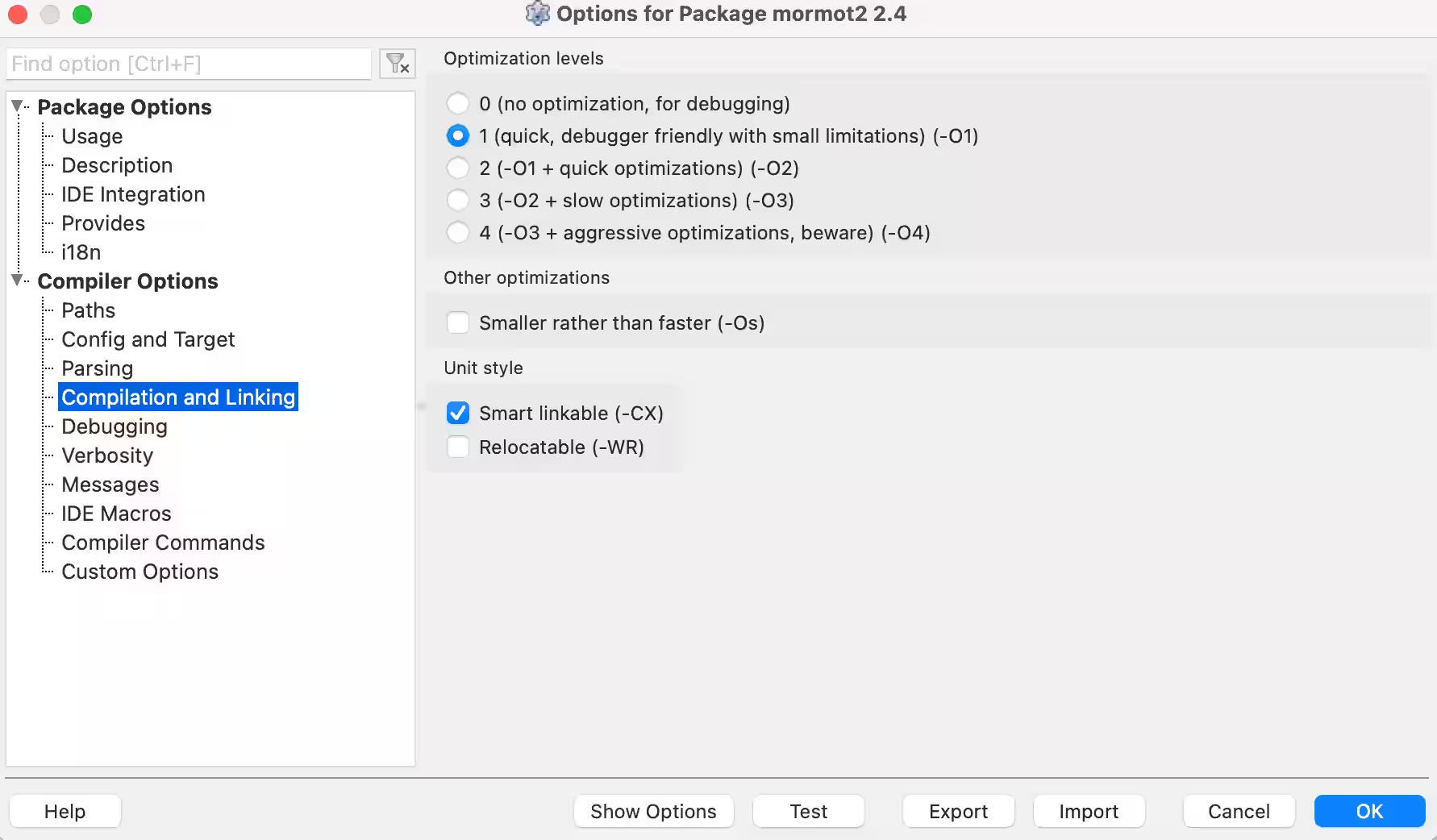
Last edited by rcla (2026-07-17 23:37:08)
Offline
#6 2026-07-18 03:55:14
- rcla
- Member
- Registered: 2025-12-13
- Posts: 22
Re: TWebSocketAsyncServer and MacOS
Using my MacBook Air with the M4 chip, I installed Rosetta and built an x64 version of Lazarus.
I compiled the "echo" example for x64 and ran it on the MacBook with the M4 chip, but the WebSocket connection closed after about two minutes.
I managed to borrow a 2019 MacBook Pro with an Intel Core i9 processor. I ran the same x64 "echo" example, and it took longer for the WebSocket connection to close around 13 minutes.
I ran the "mORMot2 Regression Tests" on both computers:
Test1: mORMot 2.4.15851 and Apple M4
macOS 26.5.2 Tahoe (Darwin 25.5.0) [utf8 16GB 19050003]
10 x Apple M4 [4MB] (aarchcpu64)
on Mac16,13
Using mORMot 2.4.15851 17 Jul 2026
TSqlite3LibraryStatic 3.51.2 with internal MM
Generated with: Free Pascal 3.2.3 64 bit OSX compiler
Total assertions failed for all test suits: 13 / 196,078,851
Test2: mORMot 2.4.15851 and MacBookPro Intel Core i9
macOS 26.3.1 Tahoe (Darwin 25.3.0) [utf8 32GB 19030003]
16 x Intel(R) Core(TM) i9-9980HK CPU @ 2.40GHz [16MB] (x64)
on MacBookPro16,1
Using mORMot 2.4.15851 17 Jul 2026
TSqlite3LibraryStatic 3.51.2 with internal MM
Generated with: Free Pascal 3.2.3 64 bit OSX compiler
Total assertions failed for all test suits: 13 / 195,368,976
Offline
#7 2026-07-18 06:56:44
Re: TWebSocketAsyncServer and MacOS
You don't have OpenSSL libraries so the TLS/HTTPS part did fail, as expected on plain Mac OS.
There are some at https://synopse.info/files/OpenSSLMacA64.tgz
So I don't think there is any special regression on M4 in respect to M1/M2.
Especially the websockets look fine:
- Websockets: 69,691 assertions passed 340.60ms
1=11741/s 2=22419/s 5=24172/s 10=23047/s 30=20508/s 50=18004/s
It is therefore not a compilation issue, nor a CPU issue.
As I wrote before:
Can you debug on the Mac and check the actual TWebProcessInFrame.GetHeader process step by step (and ensure opcode/masked/len32 values seem legit)?
If you can't debug with Lazarus, at least try to add some ConsoleWrite() or writeln().
Online
#8 2026-07-18 14:21:00
- rcla
- Member
- Registered: 2025-12-13
- Posts: 22
Re: TWebSocketAsyncServer and MacOS
Regarding "mORMot2 regression tests" on my M4 MacBook Air:
With the "OpenSSLMacA64.tgz" libraries you provided, everything now shows as OK. Thanks.
Total failed assertions across all test suites: 0/197,972,570
For the "echo" test program, I added the following "writeln()" statements:
function TWebProcessInFrame.GetHeader: boolean;
begin
  result := false;

  WriteLn('');
  WriteLn('Start GetHeader');

  if len = 0 then
  begin
    data := '';
    FillCharFast(hdr, SizeOf(hdr), 0);
  end;
  if not HasBytes(@hdr, 2) then // first+len8
    exit;
  opcode := TWebSocketFrameOpCode(hdr.first and 15);
  masked := hdr.len8 and FRAME_LEN_MASK <> 0;

  WriteLn('opcode: ', opcode);
  WriteLn('masked: ', masked);

  if masked then
    hdr.len8 := hdr.len8 and (FRAME_LEN_MASK - 1);
  if hdr.len8 < FRAME_LEN_2BYTES then
    hdr.len32 := hdr.len8
  else if hdr.len8 = FRAME_LEN_2BYTES then
  begin
    if not HasBytes(@hdr, 4) then // first+len8+len32.low
      exit;
    hdr.len32 := bswap16(hdr.len32);
  end
  else if hdr.len8 = FRAME_LEN_8BYTES then
  begin
    if not HasBytes(@hdr, 10) then // first+len8+len32+len64.low
      exit;
    if hdr.len32 <> 0 then // size is more than 32 bits (4GB) -> reject
      hdr.len32 := maxInt
    else
      hdr.len32 := bswap32(hdr.len64);
    if hdr.len32 > WebSocketsMaxFrameMB shl 20 then
      EWebSockets.RaiseUtf8('%.GetFrame: length = % should be < % MB',
        [process, KB(hdr.len32), WebSocketsMaxFrameMB]);
  end;

  WriteLn('hdr_mask: ', hdr.mask);
  WriteLn('hdr_first: ', hdr.first);
  WriteLn('hdr_len8: ', hdr.len8);
  WriteLn('hdr_len32: ', hdr.len32);
  WriteLn('hdr_len64: ', hdr.len64);

  if masked then
  begin
    len := 0; // not appended to hdr
    if not HasBytes(@hdr.mask, 4) then
      EWebSockets.RaiseUtf8('%.GetFrame: truncated mask', [process]);
  end;
  len := 0; // prepare upcoming GetData
  result := true;
end;
And it shows:
Start GetHeader
opcode: focPong
masked: TRUE
hdr_mask: 0
hdr_first: 138
hdr_len8: 0
hdr_len32: 0
hdr_len64: 0
Sometimes the error occurs and the WebSocket connection closes the second time "focPong" is executed; at other times, it happens the fourth time.
Offline
#9 2026-07-18 14:47:47
Re: TWebSocketAsyncServer and MacOS
It sounds like if the client frame is incorrect/truncated.
https://gist.github.com/synopse/0f86220 … 9ab77671f7
Weird.
With which browser do you try the html?
Online
#10 2026-07-18 16:04:27
- rcla
- Member
- Registered: 2025-12-13
- Posts: 22
Re: TWebSocketAsyncServer and MacOS
I am using the Safari browser.
Thank you for your help and detailed explanation. (ws analysys.md)
Inside Quick Fix/Workaround:
  if not GetBytes(@hdr.mask, 4) then
  begin
     ...
shows Error: Identifier not found "GetBytes"
Maybe it should be "HasBytes"?
I am going to make this change and run more tests.
Offline
#11 2026-07-18 18:35:20
- rcla
- Member
- Registered: 2025-12-13
- Posts: 22
Re: TWebSocketAsyncServer and MacOS
I initially made that change, but the WebSocket connection kept closing, and I encountered other types of opcodes...
So, I reverted to the original code, recompiled, and switched to the Microsoft Edge browser (the same one that was working on Windows).
Now it works without issues. It has been running for two hours and hasn't closed.
You were absolutely right; the problem was on the JavaScript client side.
Thank you very much for all your help.
Offline
#12 2026-07-18 18:46:49
Re: TWebSocketAsyncServer and MacOS
Grok did hallunicate and did not understand at all the HasBytes() feature and how it should be synched with len.
Anyway I may be able to attempt a fix somehow, and properly wait for more data and don't raise an execption, which is not very clean at all.
Online
#13 2026-07-20 08:07:27
Re: TWebSocketAsyncServer and MacOS
I have tried to fix the issue.
Please try with
https://github.com/synopse/mORMot2/commit/02a11d657
I hope it would now work with Safari out of the box.
Otherwise there is a serious Safari bug about Websockets, but it is very unlikely.
The main problem may come from the OS network layer, which sends packets sooner than expected, with all needed information at once. It is perfectly valid at TCP and Websockets level, so the mORMot code did have to be fixed and accept such truncated input.
Please try and report here if it is fixed.
Online
#14 2026-07-20 15:25:37
- rcla
- Member
- Registered: 2025-12-13
- Posts: 22
Re: TWebSocketAsyncServer and MacOS
I updated to version '2.4.15874'.
It works like a charm.
It has been running for two hours with the Safari browser, and the WebSocket connection hasn't interrupted.
Thank you so much for your help.
Offline
Pages: 1